

When you are running dozens of localization projects, keeping track of every moving piece is hard. How do you ensure your AI engines always have enough context, your glossaries stay updated, and your published content doesn’t go stale?
This month, we are introducing automated guardrails to handle that operational maintenance for you.
Crowdin Advisors: A background check for your project setup that automatically flags missing screenshots, thin glossaries, or unattached style guides, and many more.
Re-Translation: A two-click workflow to refresh and upgrade already published AI translations whenever your pipeline improves.
Crowdin Copilot in the Global UI: A personal assistant pinned directly to your top navigation bar to run complex bulk actions across your workspace via simple chat.
Let’s dive into the details.
Crowdin Advisors: Automated guards for your localization setup
Software engineering has spent decades wrapping code in automated checks. Linters check style conventions. Type checkers catch errors before runtime. Static analyzers flag security issues and quality regressions. Pre-commit hooks and CI quality gates make these checks continuous; rules apply to every single code change, not during a manual audit once a quarter.
Every project has rules. As teams and codebases grow, no single person can remember everything, and manual reviews cannot catch everything. So, you encode the rules into your infrastructure and let tools monitor the project for you.
Localization projects have rules, too. Some are obvious: glossary terms must stay consistent, style guides should be followed, and UI strings need visual screenshots. Others are subtler: a new language is added but lacks glossary entries, or a project shifts from technical documentation to marketing, but the tone-of-voice guidelines never get updated.
But keeping track of these rules across a large portfolio is hard. We work with teams running over 500 active localization projects. At that scale, you can’t easily know if a specific project (like a quick mobile app for a conference) is properly configured for reliable AI translation. To find out, you would have to open it up and manually check the screenshots, style guides, and glossaries. Doing that for hundreds of projects is simply impossible.
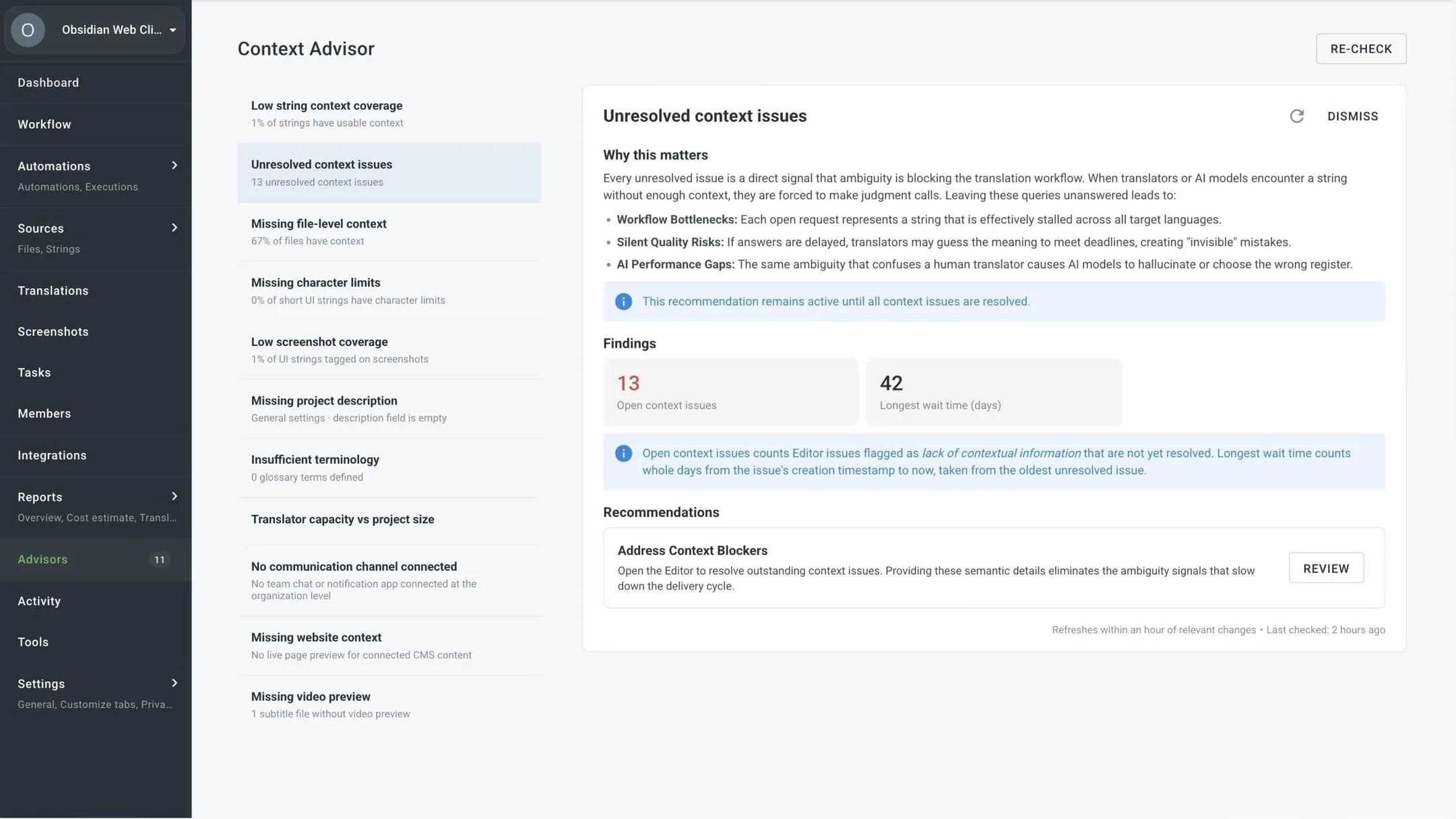
This month, we are introducing Advisors, a native feature in Crowdin that monitors your projects and flags when something is missing, drifting, or under-configured. Think of it as a linter for your localization setup.
What Advisors check
An Advisor is a check that runs against a project and produces advice – a recommendation, a warning, or a suggestion for improvement. The first set of native Advisors covers the configuration dimensions that most directly affect translation quality.
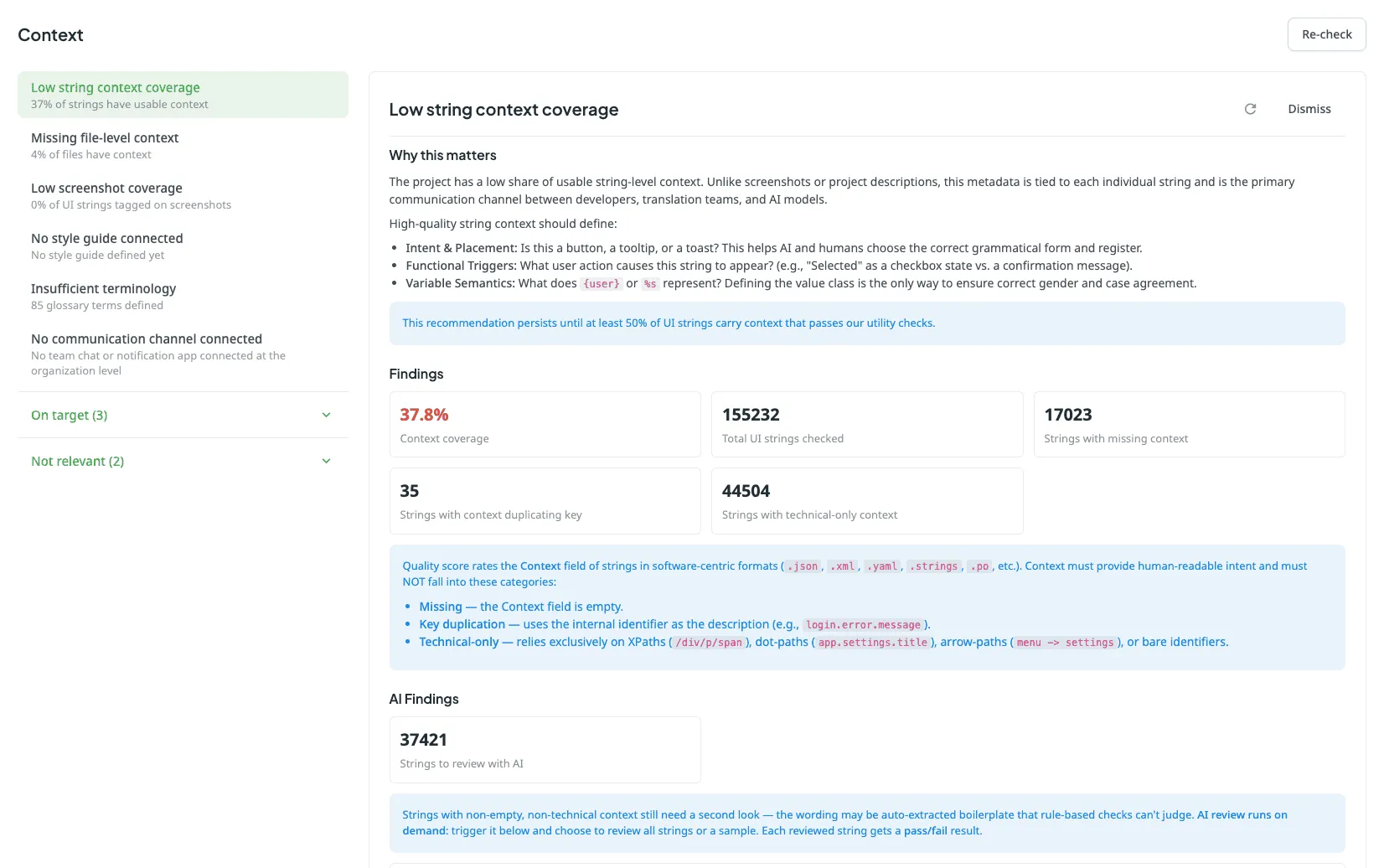
- Context coverage: Using AI, this check analyzes whether your files carry enough contextual details, such as uploaded screenshots, developer comments, or file descriptions, to ensure predictable translation results. On massive projects, instead of scanning everything, it automatically checks a random sample of your text.
- Terminology guardrails: The Advisor scans your source text for matches to your glossaries. It flags thin or missing glossaries before they cause inconsistent machine output downstream, and highlights frequently used words that should be formalized as official terms.
- Style guide presence: It checks whether a style guide is attached and whether it covers your target languages. It ensures the guide covers the basics (like formality, audience, and brand voice), so, for example, the AI pipeline doesn’t have to guess.
- App recommendations: Some content types need more than configuration – they need specialized tools. If you are translating subtitles, the Advisor will suggest installing an app that previews video in the Editor. If you are translating a headless CMS, it will recommend a plugin that renders the page, because headless CMS content rarely carries its own context. The Advisor knows which content types tend to be underserved by defaults, and points to the apps from Crowdin Store that fix that.
Extensible: Advisors as a platform
The native Advisors listed above are just the first step. While we are launching with these core checks, we designed the entire mechanism to evolve into an open platform.
In the nearest future, Crowdin Apps will be able to implement their own Advisors. This means apps from the Crowdin Store will be able to register custom checks, run them against projects, and surface unique insights within the same interface.
We expect more Advisors to come for things we would never write ourselves: industry-specific compliance checks, integration-specific guardrails, custom QA rules tied to a particular workflow. The platform is there to be used.
Who are the Advisors for
- Fractional localization managers who need a guided path to a good setup. Instead of reading documentation on glossaries, style guides, screenshots, context, and pre-translation prompts and then guessing which ones they actually need, they can have the Advisors point out what is missing for their project specifically. The setup that produces predictably high translation quality stops being tribal knowledge and becomes a checklist that fills itself in.
- Advanced localization managers running large portfolios get a different benefit: continuous verification at scale. Setting up one project well is easy. Keeping 500 projects in good shape as they evolve – new languages added, scope changed, content categories shifted – is the actual job. Advisors make it possible to open any project in the portfolio and immediately see whether its setup matches the organization’s standards, without going through it manually.
Localize your product with Crowdin
Re-translation: Refresh your published AI content
The AI translation you published last year is already outdated. Here’s what to do about it.
More and more teams are publishing AI translations without a human review step. This isn’t a compromise they’re forced to make – it’s a deliberate choice.
With a properly configured AI Pipeline, a decent glossary, style guides, and content-type relevant context, AI produces translations that are consistent and ready for deployment. Not perfect by every standard, but good enough for short-shelf-life content, like documentation pages, release notes, changelogs, and support articles.
But AI translation quality isn’t static.
AI translation quality is improving at a pace that makes any fixed output increasingly stale. But the model version is only part of the equation – and arguably not the most important part.
How you implement AI matters more than which model you use when comparing today’s top models. A well-constructed pipeline with proper context retrieval, multi-step quality checks, and style guide enforcement will consistently outperform a better model with a naive single-prompt setup. The results aren’t comparable
So when any of the following happen, the translations you already published become candidates for improvement:
- A new or majorly updated style guide is available.
- Glossary terms were added, changed, or corrected.
- A newer model is now in your pipeline.
- You’ve improved the pipeline’s structure – better context retrieval, new QA steps, and a coherence check that wasn’t there before.
Each of these is a meaningful reason to re-translate. Not because the original was wrong, but because the new output will be measurably better.
Introducing Re-Translation
Re-Translation is a new concept we’re introducing in Crowdin: the ability to retranslate already translated content and republish it in two clicks.
You don’t need to re-import files, recreate tasks, or manually track which strings were AI-translated. Crowdin knows. The scope, the target languages, the pipeline configuration – it’s all already there. Re-Translation runs the current pipeline against existing AI-translated strings and pushes the updated output to your connected repository.
How it works
We have updated our UI terminology, renaming the traditional “Pre-translate” menu to Auto-translate. Inside the updated dialog, a new Scope section gives you precise control over your content refreshes:
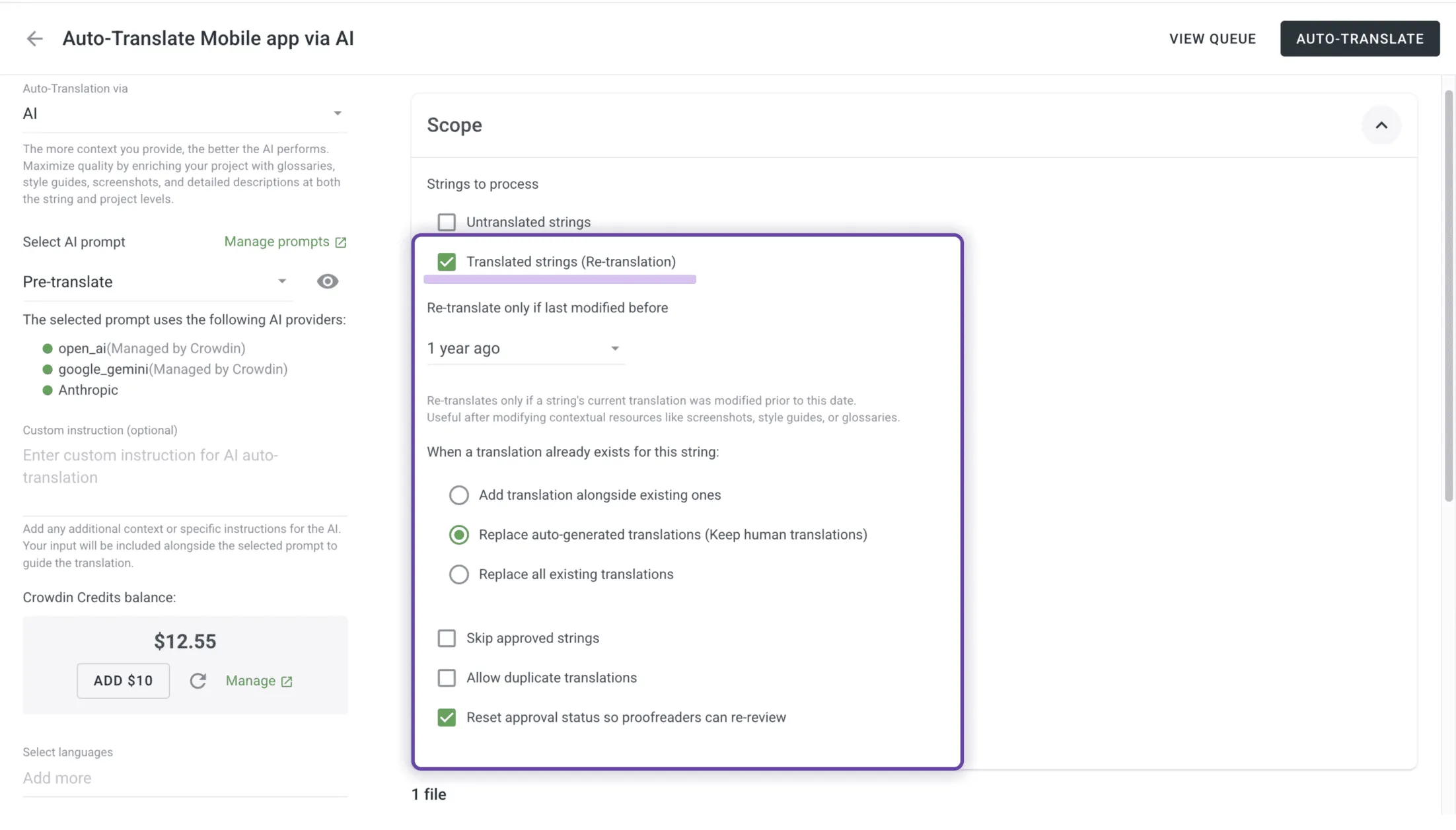
- Select your files or languages: Choose exactly what you want to refresh.
- Configure your scope filters: You can target untranslated strings, previously translated strings, or filter your translated text by age (e.g., refreshing content older than 7 days, 30 days, or a custom range).
- Choose translation logic: Tell Crowdin whether to add the new translation alongside the existing one, replace only older auto-generated translations (produced by MT or AI), or completely replace all current versions.
- Deploy: Crowdin runs the current AI pipeline against your selected strings and pushes the updated output directly to your connected repository.
The dialog also automatically remembers your last selected options between runs, saving you configuration time during frequent updates.
This is possible because of how Crowdin works. Unlike many translation tools, Crowdin maintains a persistent connection to your content repository – whether that’s a CMS, a marketing automation platform, or a code repository. Crowdin understands your project scope: what you’re translating, how it’s structured, and how it maps to your publishing targets.
The concept of continuity has always been built into Crowdin. When translators revised a few segments, the updated translation propagated immediately. Re-Translation extends this same logic to the AI era, where “a few segments” can mean an entirely regenerated file produced in seconds.
Crowdin Copilot: always at hand in the UI
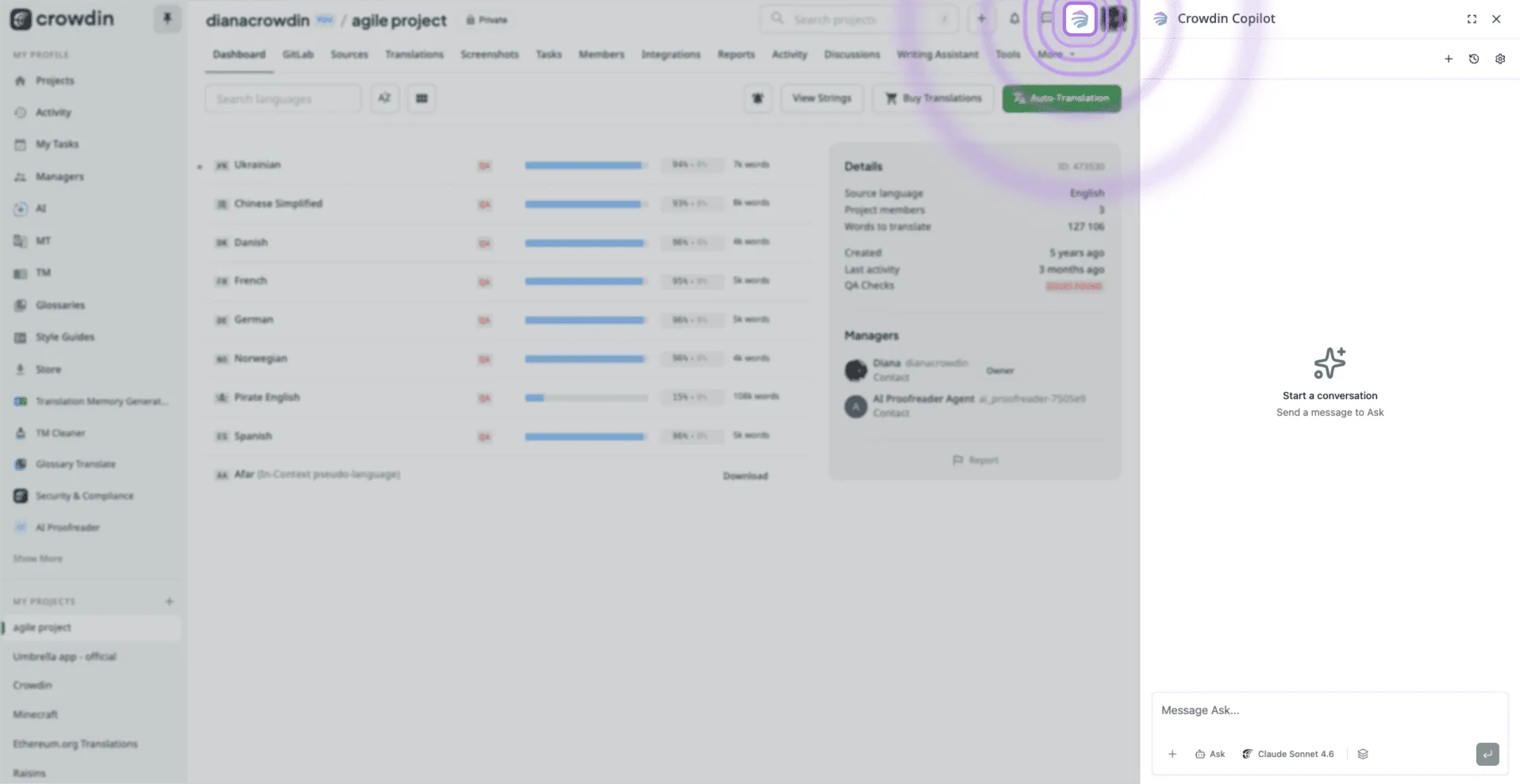
One of the most exciting highlights of April is the introduction of a better UI placement for Crowdin Copilot. Available not only in the project menu or tools, Crowdin Copilot now sits on top of the entire Crowdin platform. Always within reach in the top menu, it acts as a personal assistant for localization managers and developers.
How it works: You can now find the shortcut icon for the Crowdin Copilot directly in the platform’s main navigation menu in the top right corner. Unlike other AI tools that only know about the text you give them, the Copilot has full access to project data via our API and can perform many actions as a manager. You can ask it questions about your files, check the status of specific tasks, or query your glossaries.
Real-life benefit: Instead of manually searching for strings that haven’t been translated or checking which project has the most overdue tasks, you just ask. It can also perform bulk actions. You can tell it to “Add Spanish to all projects in the Mobile App group” or “Delete all strings tagged as ‘legacy’ across three different projects”, and it handles the API calls for you in seconds.
Crowdin Store: Ecosystem growth and updates
Applications updates
App updates are now safer and easier to track. When an app requests new permissions or simply receives an update, it displays an “Update available” label, and can be updated in a few clicks without re-installation, as it was previously. Managers can inspect the precise differences between the old and new permission requests before safely approving the update.
New apps in the Crowdin Store
We are continuously expanding our marketplace to ensure Crowdin integrates natively with your existing technical stack. Here are the newest apps available this month:
- Contributor ID Link: Simplifies tracking of volunteers and internal contributors across global codebases.
- MadCap Flare: allows you to easily translate your technical documentation directly to Crowdin for continuous localization runs.
- NVIDIA NIM: Integrates NVIDIA AI models directly into your automated AI translation steps at Crowdin.
- Mintlify: Automatically extracts and synchronizes developer documentation for immediate translation updates.
- Microsoft Visio: Introduces native support for (VSDX Files), localizing diagrams and structural visual layouts.
Crowdin Store hits 100k installations
This month, the Crowdin Store hit a major milestone: over 100,000 app installations. This confirms a clear industry shift toward customized localization ecosystems: instead of relying on a single, rigid tool, teams are assembling their own automation stacks. Today, more than 3,000 organizations and 40,000 professionals use the store, with active companies running an average of 7 apps simultaneously. While our GitHub integration remains the leader with 35,000 installations, tools like the AI Pipeline are growing fast, helping content flow straight from codebases, cloud drives, and CMS platforms without technical bottlenecks.
New podcast episodes
This month on the Agile Localization Podcast, we released two new episodes:
- Navigating Hyper-Growth and Cross-Functional Localization with Rutva Safi – We discuss how to secure buy-in from product and engineering teams early on, keep translation cycles in sync with fast-moving product sprints, and build a translation infrastructure that scales during rapid company growth.
- How Turo Embeds Localization Inside Product Ops with Gideon Hod – We explore how integrating localization directly into Product Operations helps optimize workflows, bridge the gap between product managers and translators, and deliver a high-quality global experience for users.
You can listen to both full episodes right now on Apple Podcasts, Spotify, or YouTube.
Other updates
- Webflow app now supports alt text synchronization and translation.
- Added Gemini 3.5 flash
- Removed AI Assistant. (Try Crowdin Copilot instead)
External tools
We also released new versions of:
- JS API Client 1.55.2, 1.55.3
- Context Harvester 0.9.0 (legacy tool — see Context Enrichment with AI Agents)
- Figma Plugin 111
- Unity Plugin 0.11.0
- Ruby API Client 1.14.0
- Android SDK 1.18.1
- iOS SDK 1.16.1
- Flutter SDK 1.1.1
Localize your product with Crowdin

Crowdin Team